
Ticket types are how you tell buyers what they are choosing between, and pricing tiers are how the price moves without you touching it. Get both right and the event page sells itself; get them wrong and you spend the run-up answering emails about which ticket does what. This guide covers the decisions in the order you make them, with a worked example for a 200-seat room.
Start with fewer types than you think
Every extra ticket type is a decision you are asking a buyer to make on their phone in a queue. Most events need two or three: a standard ticket, something cheaper for people who deserve it, and something dearer for people who want more. Name them by what the buyer gets, not by who you think they are. "Includes a welcome drink" sells; "Tier B" does not.
The fields on every type
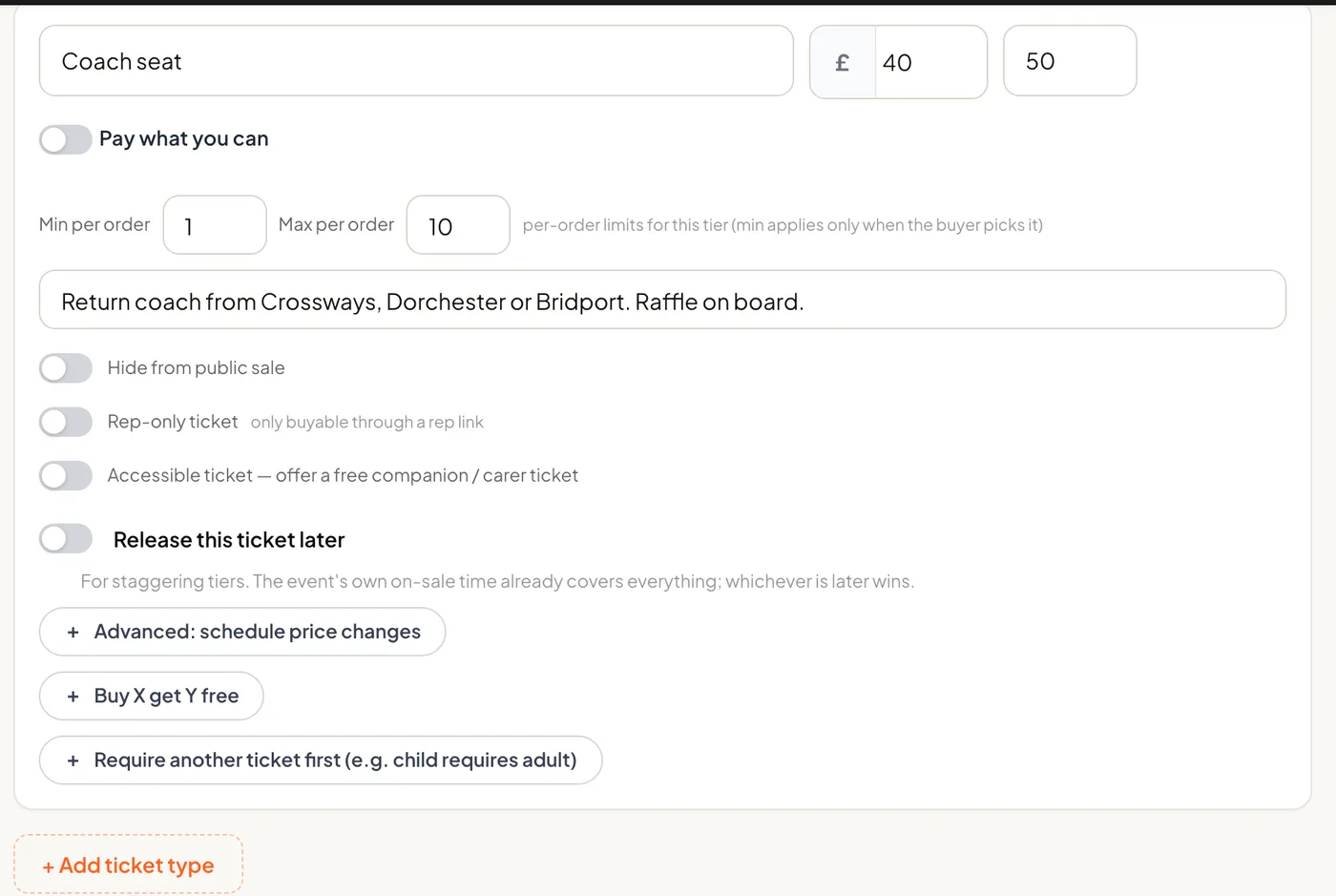
- Name and description. The name is what shows on the page, the ticket and the door list. The description is the place for "includes", "over 18s only" or "seated in the balcony".
- Price. Entered as a decimal, for example 12.50. On tickts this is what the buyer pays when you absorb the card fee, or the base before the fee when you pass it on.
- Capacity. How many of this type exist. Once it reaches zero the type shows as sold out on its own; the other types keep selling.
- Minimum and maximum per order. Force a Family ticket to be bought in fours, cap VIP at two per buyer, or leave both open.
- Hidden. A hidden type never shows on the public page. It is unlocked by a promo code, which is how you run comp allocations, staff tickets and a rate for members without advertising any of them.
Pricing tiers: the price that moves by itself
A tier is a price with a trigger. On tickts each ticket type can carry up to four, switching either when a quantity has sold or when a date passes, and the switch happens on its own the moment the trigger is hit. The classic shape is three:
| Tier | Trigger | Price |
|---|---|---|
| Early Bird | Until 30 May, or the first 50 sold | £12.00 |
| Standard | From 31 May | £15.00 |
| Late | From the week of the event | £18.00 |
Date triggers reward people who commit early and give you cash flow when you need it for deposits. Quantity triggers reward the first through the door and create a visible reason to buy now. Either way the event page shows the current price and, where the buyer has more than one price to choose from on that date, a "From" price rather than a bare number, so nobody feels ambushed at checkout.
Never move a price back down in public. A fan who paid £15 last week and sees £12 today has been taught to wait next time. If you must discount late, do it with a code sent to a list, not with a tier everyone can see.
Overall capacity: the number the room actually holds
Types have their own capacities, but a room has one. If you sell a Standard type capped at 150 and a Family type capped at 100 into a 200-seat venue, nothing stops the two adding up to 250. On tickts each date has an optional overall capacity that caps the total sold across every type combined, on top of each type's own stock. Set it to what the licence says and stop worrying about the arithmetic. It is also what lets you run a small hidden comp allocation without reserving seats for it: the comps count inside the total, and whatever the guest list does not claim stays on sale to the public.
A 200-seat room, worked through
| Type | Price | Capacity | Limits |
|---|---|---|---|
| Standard | £15.00, Early Bird £12.00 until 30 May | 200 | Max 6 per order |
| Concession | £10.00 | 60 | Max 2 per order |
| Guest list (hidden) | £0.00 | 12 | 1 per person, by code |
Overall capacity for the date: 200. The concession cap stops a room full of £10 tickets, the standard cap is the room, and the overall capacity is the only number that has to be right. Twelve guest-list places exist but are not held back; if six are claimed, 194 tickets go on public sale.
Other things a type can do
- Seated events. Assign a seating layout to the date and buyers pick their seat, or press Best Available and let the system find the best block together.
- Home and away. For fixtures, a type can belong to the home or away allocation, and the label follows the ticket to checkout, the PDF and the order, so supporters are kept apart by design rather than by stewarding.
- Group discounts. On Growth and above, a discount applies itself when a buyer hits a minimum quantity, shown in the basket the moment the threshold is reached.
- Payment plans. On Growth and above, a buyer pays a deposit and Stripe collects the rest in instalments before the event, which is what turns a £150 ticket into three payments of £50.
- Free tickets. Price a type at £0 and it needs no Stripe account at all; the buyer still gets a QR ticket to scan.
- Add-ons. Merchandise, programmes or a meal are add-ons sold alongside the ticket, not extra ticket types, so they never eat into the capacity.
Changing types after tickets have sold
You can raise a capacity, add a type or add a later tier at any time. Deleting a type that has sold tickets is the one edit to think twice about: the tickets stay valid, but they no longer belong to a type with a capacity, so your counts drift. Hide the type instead, or set its capacity to what has already sold.
